
Tennis Club Local SEO: Get Found & Fill Courts
2026-08-22 · 7 min read
Most tennis clubs are invisible to players searching nearby. This guide covers GBP setup, booking page SEO, review strategy, and keyword structures that fill courts year-round.
There are 27.3 million tennis players in the United States [2], and roughly 270,000 courts to serve them [2]. Yet when a player moves to a new city and searches "tennis club near me," the same few clubs appear in the local 3-Pack — and the rest are effectively invisible. The local 3-Pack captures 44% of all clicks on the results page [1]. If your club isn't in it, you're handing new members to competitors who figured out local search first.
This guide covers exactly what drives local rankings for tennis clubs: your Google Business Profile, your booking page, your review cadence, and the three keyword structures that map most closely to how players actually search.
Why Local Search Is Where New Members Find You
Tennis players don't browse directories or ask friends the way they used to. They open Google Maps, type something like "tennis lessons [city]" or "tennis courts open now," and pick from the first two or three results. Those results are determined by three factors Google weights most heavily: proximity, relevance, and prominence [1].
Proximity you can't change — your courts are where they are. Relevance and prominence are entirely within your control, and they're what separate clubs that rank from clubs that don't. Google Business Profile optimization accounts for roughly 32% of local ranking factors, and reviews account for another 20% [1]. Those two levers — your GBP and your review base — are where most of the win is.
The third lever is your own website and booking page. When your site includes location-specific language, structured data, and a working booking flow, it reinforces your GBP signals and gives Google a second confirming source that you're a real, active tennis club in that location.
Set Up Your Booking Page as a Local SEO Asset
Most club websites are built for people who already know the club exists. A booking page built for local SEO serves a different job: it needs to tell Google exactly what you offer, where you are, and who you serve — in language that matches how players search.
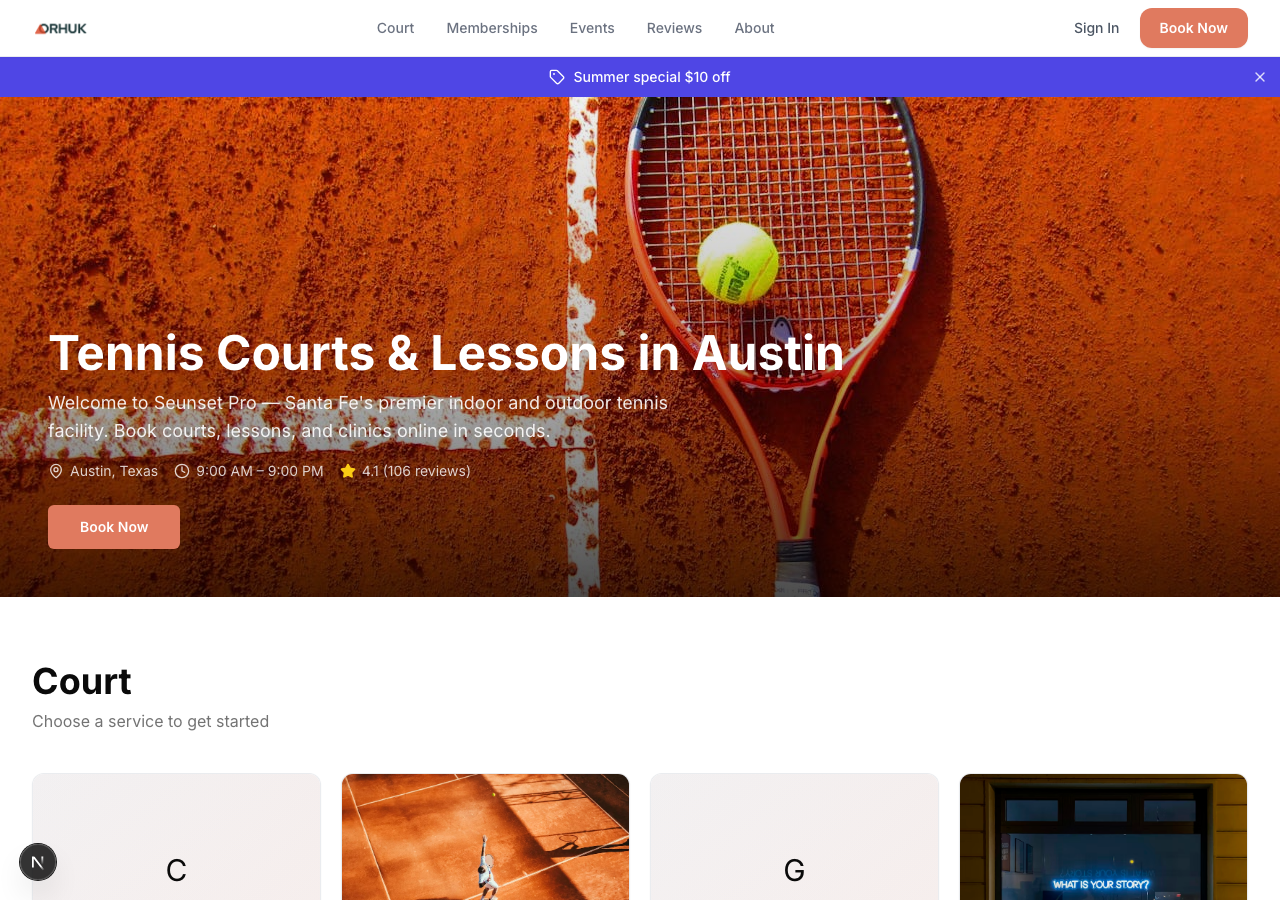
What your booking page needs to rank:
- Location in the page title and H1. "Book a Tennis Court in [City]" performs better than "Book Now" for local search. Include your neighborhood or district if you serve a specific area. - Service-specific language. Separate pages or sections for adult leagues, junior programs, private lessons, and open play let you capture multiple search intents rather than one generic phrase. - NAP consistency. Your club name, address, and phone number on the booking page must match your GBP exactly — same formatting, same spelling. Inconsistency is a relevance signal Google penalizes. - A working booking flow. Google can detect dead links and booking flows that break. A booking page that actually works and converts signals to Google that your business is active.
Orhuk gives clubs a live booking storefront with a public URL at orhuk.com/[your-club]. That page is indexed by Google, carries your club name and service categories, and updates automatically as you add programs. It also gives you a consistent URL you can link from your GBP, which strengthens the association between your listing and your booking capability.
Claim and Fully Complete Your Google Business Profile
Your GBP is the single most impactful local SEO asset you control. A fully completed profile with the right category, accurate hours, photos, and posts consistently outranks incomplete profiles in the local 3-Pack.
Start with the right primary category. "Tennis Club" is the correct primary category for most facilities. If you also run a fitness center or sport court rental operation, you can add secondary categories — but your primary must match the core business. 86% of GBP views come from category-based discovery searches rather than direct brand name searches [3], which means your category determines whether you show up when players search by service type rather than by your club name.
Complete every field: - Business hours including seasonal variations and holiday schedules - Phone number and website URL (link to your booking page, not just your homepage) - Service area if you offer mobile lessons or programs at multiple facilities - Products/Services section listing your lesson formats, court types, and program categories - Photos: exterior, courts, staff, action shots — Google gives higher prominence to profiles with recent photo activity
Post regularly. GBP posts (updates, offers, events) are indexed content that reinforces your relevance signals. A post announcing "Summer Junior Tennis Camp — Registration Open" does two things: it tells Google you're active, and it can appear in the local search results panel for players searching for junior programs.
Build Your Review Base the Right Way
Reviews are the most visible trust signal in local search, and the second most weighted ranking factor after GBP signals [1]. A club with 80 reviews at 4.6 stars will almost always outrank a club with 15 reviews at 4.9 stars, because volume and recency both matter.
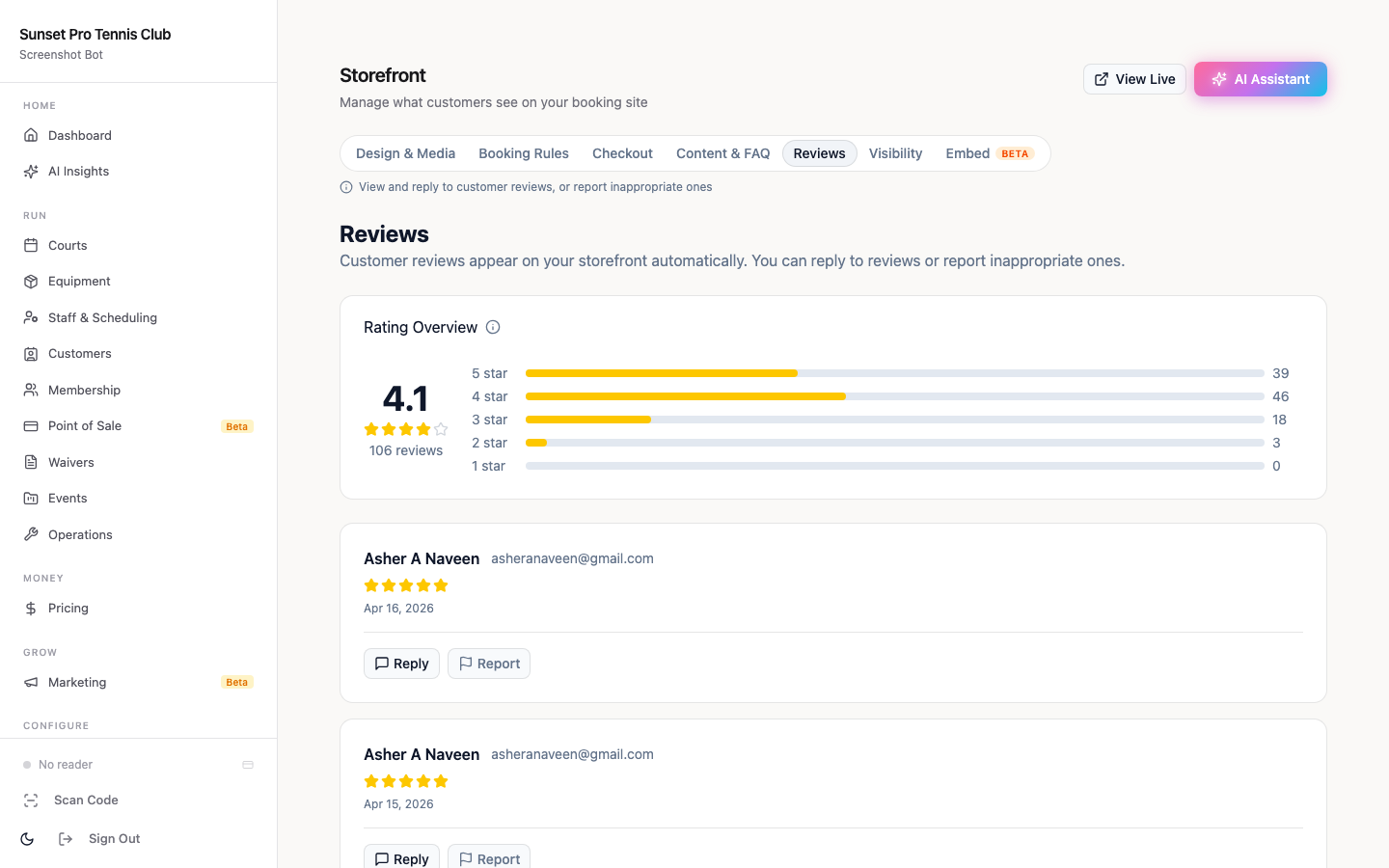
The clubs that build strong review bases do one thing differently: they ask consistently, not occasionally. 70% of consumers expect businesses to respond to reviews within one to three days [1], and businesses that respond to reviews see 65% more conversions from their listing [1]. Reviews aren't just a ranking factor — they're a conversion layer between a player finding you and a player booking with you.
A simple review cadence that works: - After every session or program completion, send a short follow-up message with a direct link to your GBP review form - Reply to every review within 48 hours — positive and negative alike - For negative reviews, acknowledge the experience, offer a resolution path, and keep the tone professional - Never incentivize reviews (against Google policy) or ask for reviews only from players you know are happy (review-gating, also against policy)
Orhuk's storefront automatically displays your player reviews and can route post-session feedback messages, so the ask goes out automatically rather than depending on a staff member to remember.
The Three Local Keyword Structures That Fill Courts
Most tennis clubs either target no keywords deliberately ("we just have a website") or target overly broad terms like "tennis lessons" that they'll never rank for nationally. The keyword structures that actually drive bookings are local and intent-specific.
Structure 1: [Service] + [City/Neighborhood] Examples: "tennis lessons Austin," "tennis courts Midtown Manhattan," "adult tennis clinic Denver" These are the high-conversion searches — someone in your market looking for exactly what you offer. Your booking page, GBP, and any blog content should include these phrases naturally.
Structure 2: [Qualifier] + [Service] + [Location] Examples: "beginner tennis lessons near me," "indoor tennis courts open on weekends," "women's tennis league Chicago" Qualifier terms narrow the search to a specific need. These are often easier to rank for than pure service + city terms because fewer competitors target them precisely.
Structure 3: Problem-first searches Examples: "how to find a tennis partner in [city]," "where to play tennis [neighborhood]," "best tennis club for beginners [city]" These often appear in featured snippets and local packs. A short FAQ section on your booking page or an informational blog post can capture these searches, then route the player to your booking flow.
You don't need to cover every variation — pick the two or three that match your core programs and build a page (or a GBP post, or a booking page section) around each one.
From Google Search to First Booking: Fixing the Drop-Off
The most common failure point in tennis club local SEO isn't ranking — it's conversion. A club can appear in the 3-Pack and still lose the player because the booking flow is broken, the site loads slowly on mobile, or the available sessions aren't visible without a login.
Players searching on mobile — which is the majority of local searches — will abandon a booking flow that requires more than three taps. The path from "tennis courts near me" → club listing → booking page → confirmed session needs to be frictionless.
What causes drop-off: - Booking flows that require account creation before showing availability - Session availability that's out of date or requires calling to confirm - Mobile sites that aren't optimized for touch-based booking - No confirmation or follow-up after booking (increases no-shows, reduces review likelihood)
What reduces it: - Live availability shown without requiring login - A mobile-optimized booking page that loads in under 2 seconds - Automatic booking confirmation with session details - Post-session follow-up that drives the review ask
Local SEO gets the player to your listing. The booking experience determines whether they convert and come back. Both matter — and they reinforce each other: more bookings → more reviews → better rankings → more bookings.
---
Orhuk is built for exactly this stack. The [public booking storefront](/blog/tennis-club-management-software-guide) gives you an indexed, mobile-optimized page for each program type. The review display on your storefront keeps social proof visible. And the automated post-session messages handle the review ask without adding to your staff's workload. [Set up your free Orhuk account](/) and your booking page goes live in under an hour — with a URL ready to link from your GBP immediately.
---
Sources [1] Whitespark — 2026 Local Search Ranking Factors (whitespark.ca/local-search-ranking-factors/) [2] USTA — 2025 Tennis Participation Report (27.3M players, ~270,000 US courts via Tennis Industry Association) [3] Google Business Profile optimization data 2026 — category-based discovery signals
Frequently Asked Questions
- What Google Business Profile category should a tennis club use?
- Use "Tennis Club" as your primary GBP category. If you also operate a broader sports facility, you can add secondary categories like "Sports Club" or "Recreation Center," but keep Tennis Club as the primary. 86% of GBP views come from category-based discovery searches, so the right primary category determines whether you show up when players search for tennis services rather than your club name directly.
- How many reviews does a tennis club need to rank in the local 3-pack?
- There's no fixed number — it depends on your local competition. In a smaller market with two or three clubs, 30 to 50 reviews with a 4.5+ average may be enough. In a dense metro area with 15+ competitors, you may need 100+ to appear consistently. What matters more than total count is recency: reviews added in the past 30 to 60 days carry more weight than a large backlog with no recent activity. Aim for five to ten new reviews per month through a consistent post-session ask.
- Does my tennis club booking page affect local SEO?
- Yes, significantly. Your booking page sends relevance signals to Google when it includes location-specific language (city, neighborhood), service-specific terms (lessons, leagues, open play), and NAP data that matches your GBP exactly. An active, working booking page also signals to Google that your business is operational. A booking page hosted on your own domain or on a platform like Orhuk that generates a public, indexable URL strengthens those signals more than a booking widget that only loads inside a pop-up.
- What booking software helps tennis clubs rank better locally?
- Orhuk gives tennis clubs a public booking storefront at a permanent URL (orhuk.com/[your-club]) that Google can index, link from your GBP, and treat as a consistent web presence. It displays your program categories, real-time availability, and player reviews — all local SEO signals — and it handles the post-session review request automatically. Setup takes under an hour, the free plan has no monthly fee (5% GMV only), and the Pro plan is $19.99/month with no transaction fees.