
Tennis Club Lapsed Member Win-Back: A 4-Email Reactivation Guide
2026-09-29 · 7 min read
Lapsed tennis club members already know your courts. Segment them by how long they've been gone, run this four-email win-back sequence, and bring them back.
Why Lapsed Members Are Your Lowest-Cost Win
The USTA's 2026 U.S. Tennis Participation Report counted 27.3 million players — a sixth straight year of growth driven almost entirely by adults 35 and older. Every one of those players who walked through your door and then stopped was already sold on tennis. They paid you once. They know the parking lot, the locker room, the vibe. Winning them back costs a fraction of acquiring someone brand new, because you skip every step of awareness and trust-building.
The iMIS 2026 Membership Performance Benchmark surveyed clubs across racquet sports and found that 70 percent name email the most effective win-back channel, ahead of direct outreach at 46 percent and social ads at 23 percent. Email wins because it is personal and asynchronous — the member reads it when they are ready, not when a staff member happens to call.
The catch is that a single blast to your entire lapsed list performs like a generic campaign, not a win-back: the iMIS benchmark reports a 12–18 percent reactivation rate for segmented sequences versus 3–5 percent for generic sends. Segmentation and sequencing are the work. This guide walks through both.
Segment by Recency Before You Send a Single Email
Not every lapsed member is equally reachable. Divide your list into three buckets before you write a word of copy:
Recently lapsed (1–3 months). These members are still warm. They may have paused for a minor reason — a travel stretch, a work crunch, a minor injury. The relationship is intact. Lead with a simple check-in, not a discount.
Mid-lapse (4–9 months). The routine has broken. They still have some emotional connection to the club, but inertia now favors staying away. A concrete value update plus a low-friction offer reopens the conversation.
Long-lapse (10+ months). These members require a stronger incentive and a clear reason to return. First-month-free or a buddy-play credit typically outperforms a flat discount because it removes the risk of committing before they have re-experienced the club.
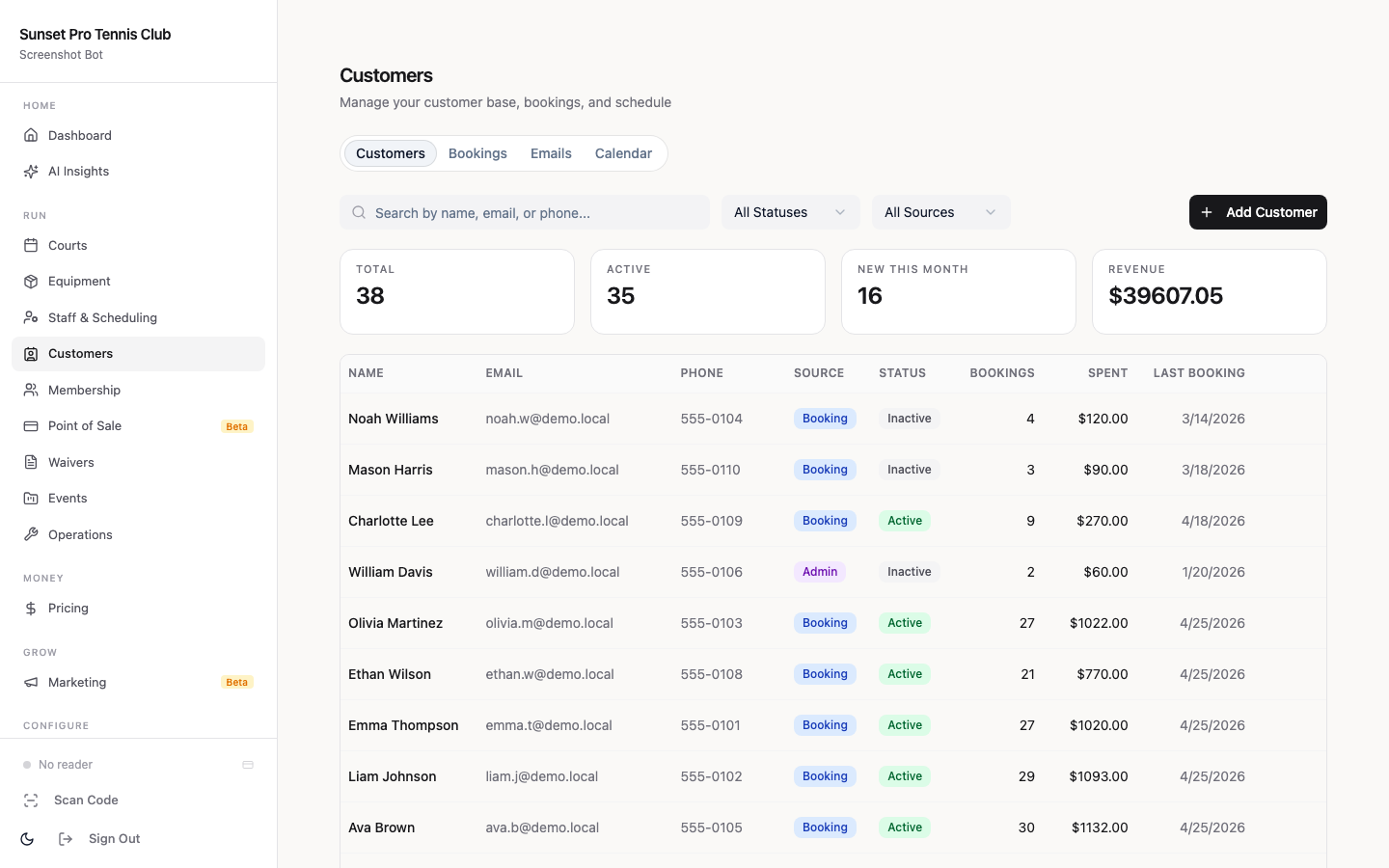
In Orhuk, open Customers → All Members, filter by membership status "Cancelled" or "Expired," and sort by cancellation date. Export or tag each recency bucket as a saved segment so your four-email sequence fires to the right tier.
The Four-Email Win-Back Sequence
Send all four emails from a named staff member — club director, head pro, or owner — rather than a generic club alias. Operators who switch from "info@" to a personal sender name report open-rate increases of 15–20 percent.
Email 1 — The Check-In (Day 1 or Day 2)
Subject: We haven't seen you on the courts lately
Keep it short: two or three sentences acknowledging the gap without pressure. Ask a soft question — "Is there anything we could have done better?" opens replies and gives you data.
*Skip the offer entirely.* Recently lapsed members who receive a discount in the first email learn to hold out for one every time they cancel.
Email 2 — The Value Update (Day 7)
Subject: Here's what's new at [Club Name]
List two or three tangible changes since they left: a resurfaced court, a new head pro, extended evening hours, a Tuesday morning social ladder. If nothing significant changed, name something consistent they may have missed — the mid-week open play they always liked, the league that just kicked off.
Close with a single soft CTA: "Come check it out — reply to this email or book a guest day below."
Email 3 — The Offer (Day 14)
Subject: A reason to come back
Now make the offer. Match it to the recency bucket: recently lapsed members get a one-time court-fee waiver or a complimentary clinic session; mid-lapse and long-lapse members get first month at 50 percent or first month free on a standard tier.
Be specific about the expiry: "This offer is valid through [date two weeks out]." Vagueness kills urgency.
Email 4 — The Urgency Close (Day 21)
Subject: Last chance — offer expires Friday
A two-sentence reminder that the offer closes. No new information, no new pitch. If the member has not acted by now, they are either not reachable by this campaign or need more time — do not extend the offer automatically or it loses its meaning next time.
Configuring the Reactivation Offer in Orhuk
You have two clean options inside Orhuk for the Email 3 offer:
Option A — Promotional membership tier. In Memberships → Levels, duplicate your standard tier and rename it "Win-Back Member." Set the price to 50 percent of standard, add an expiry of one billing cycle, and restrict availability to members with a previous cancellation on file. Share the direct sign-up link in Email 3.
Option B — Promo code on the standard tier. In Memberships → Promo Codes, create a single-use code with a 50 percent discount and a fixed expiry date. Include the code in Email 3 and Email 4. Orhuk tracks usage per code, so you can see exactly how many win-back conversions the campaign produced.
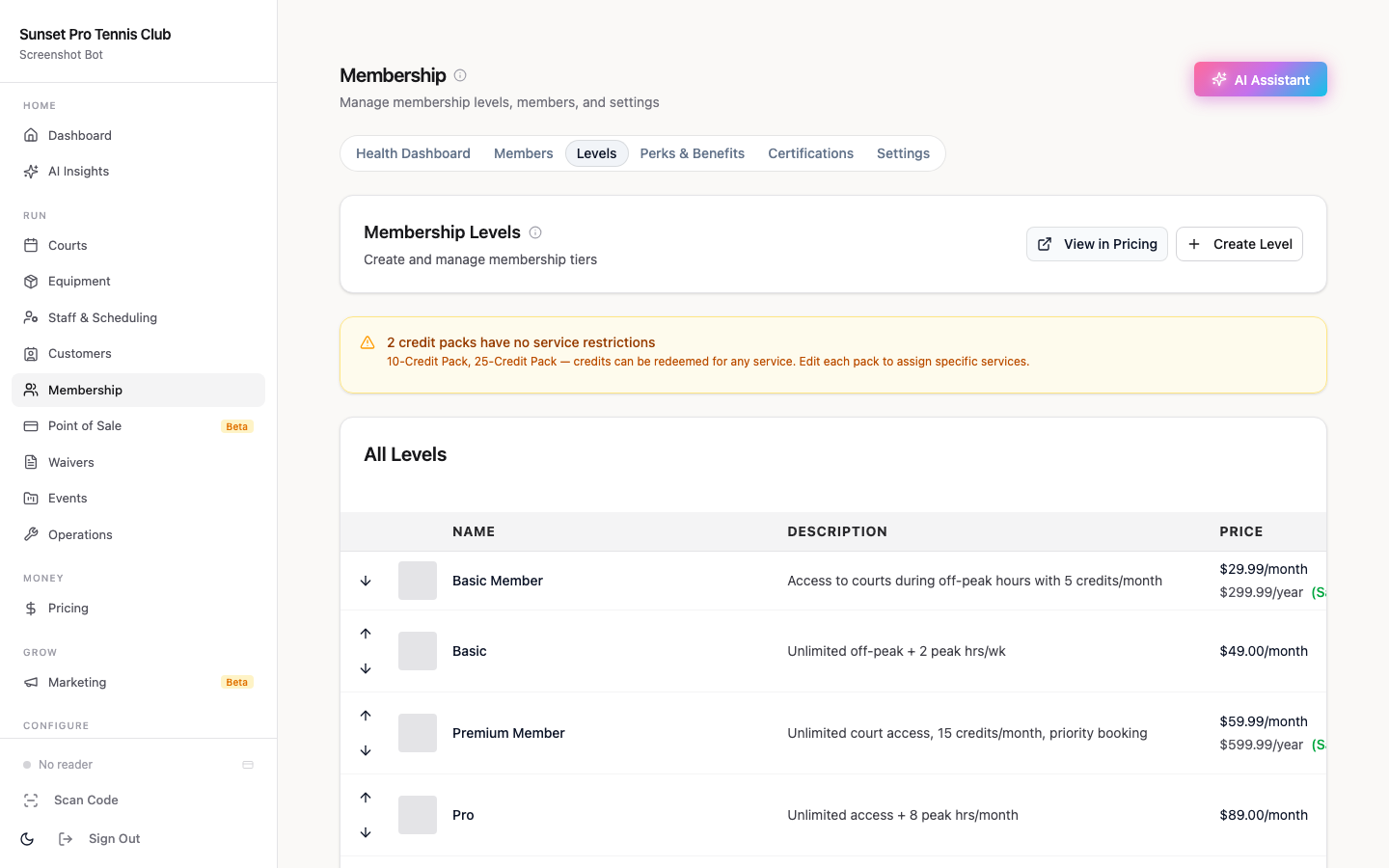
Option A keeps reporting clean — every reactivated member appears as a "Win-Back" tier in your dashboard. Option B is faster to set up and works if you prefer not to add a new tier.
Three Metrics That Show the Campaign's Working
Track these at the end of each 21-day cycle:
Reactivation rate. Reactivated members divided by total lapsed members contacted. Twelve percent or higher indicates the segmentation is working. Below five percent means either the offer is wrong for the cohort or the email list has deliverability problems worth investigating.
Reactivation-to-retention rate. Of members who came back, how many are still active 60 days later? A low reactivation rate with high retention means you are reaching the right people but the list is small — expand your segmentation window. A high reactivation rate with low retention means the offer attracted the wrong incentive-seekers — tighten the offer eligibility.
Revenue per reactivated member. Divide campaign revenue by the number of reactivations to get a number you can compare to your cost-per-new-member. When win-back revenue per member exceeds new-member acquisition cost, the case for running the sequence every quarter writes itself.
Platforms That Handle Win-Back Automation
[Orhuk](/) handles the full reactivation loop natively: member segmentation in Customers, promotional tier or promo-code configuration in Memberships, and direct payment processing when the member clicks through. Because bookings, memberships, and member records live in one system, a cancelled membership auto-populates your lapsed segment with no manual exports.
[CourtReserve](/) and [PlayByPoint](/) both support win-back email communication. CourtReserve's automation relies on external integrations for conditional sends, so operators typically export lapsed lists and run the sequence through Mailchimp or ActiveCampaign. PlayByPoint has native email tools but requires manual trigger setup for multi-step sequences. Either platform works if you already have an email stack; the extra steps add about an hour per campaign cycle.
For a deeper look at the full retention picture, see the [Tennis Club Management Software Guide](/blog/tennis-club-management-software-guide), which covers how scheduling, billing, and member communication fit together across the full member lifecycle. The [Tennis Club Email Marketing Guide](/blog/tennis-club-email-marketing) walks through list hygiene and deliverability practices that improve open rates before any win-back sequence goes live. If you are building a longer-range retention program, [Tennis Club Member Retention Software: A Practical Comparison](/blog/tennis-club-member-retention-software) and [Tennis Membership Renewal Automation](/blog/tennis-membership-renewal-automation) cover the upstream tools that reduce churn before members lapse. And if you want to close the growth loop after reactivation, [Tennis Club Referral Program: Build Word-of-Mouth Growth](/blog/tennis-club-referral-program) shows how reactivated members, who already have relationships at the club, tend to be strong referrers.
---
*Sources: USTA 2026 U.S. Tennis Participation Report (27.3M players, sixth consecutive year); iMIS 2026 Membership Performance Benchmark (70% email, 46% direct outreach as top win-back channels); US Tech Automations 2026 (12–18% reactivation for segmented sequences vs 3–5% generic).*
Frequently Asked Questions
- How do I identify lapsed tennis club members in Orhuk?
- In Orhuk, go to Customers → All Members, filter by membership status 'Cancelled' or 'Expired,' and sort by cancellation date. Tag or export members into three recency buckets: 1–3 months (recently lapsed), 4–9 months (mid-lapse), and 10+ months (long-lapse). Each bucket gets a different email sequence and offer — sending the same message to all three typically produces a 3–5% reactivation rate, while segmented sequences hit 12–18%.
- What should the first win-back email to a lapsed tennis member say?
- The first email (Day 1 or Day 2) should be a simple check-in from a named staff member — two or three sentences acknowledging the gap without any offer or pressure. Ask a soft question like 'Is there anything we could have done better?' Avoid including a discount in Email 1; members who receive one early learn to hold out for it every time they cancel. Save the offer for Email 3 (Day 14) once the relationship has been reopened with a value update in Email 2.
- What reactivation offer works best for lapsed tennis members?
- Match the offer to how long the member has been gone. Recently lapsed members (1–3 months) respond well to a one-time court-fee waiver or a complimentary clinic session — they left for a minor reason and don't need a big incentive. Mid-lapse and long-lapse members (4+ months) need something that removes risk before committing: first month at 50% or first month free outperforms a flat annual discount because the member can re-experience the club before paying full price. Always set a hard expiry date — two weeks is standard — to create urgency without devaluing the membership permanently.
- How soon after cancellation should I start a tennis club win-back campaign?
- Start within 24–48 hours of cancellation for recently lapsed members — that is when the relationship is easiest to reopen. In Orhuk, a cancellation event can trigger an automated sequence immediately: Email 1 goes out on Day 1 or Day 2, the value update arrives on Day 7, the offer on Day 14, and the urgency close on Day 21. Waiting more than a week before the first touchpoint lets the member's routine settle without the club in it, which makes reactivation harder. For members who lapsed more than three months ago, Day 1 of your outreach is whenever you launch the campaign — the urgency is lower but the sequence structure is the same.
- What reactivation rate should a tennis club expect from a win-back email campaign?
- A segmented four-email sequence should produce a 12–18% reactivation rate, according to the iMIS 2026 Membership Performance Benchmark and US Tech Automations 2026 data. Generic one-off blasts to the full lapsed list typically produce 3–5%. The gap between those numbers comes almost entirely from segmentation: matching offer intensity to recency, and sending from a named person rather than a club alias. After reactivation, track 60-day retention as the second metric — members who come back purely for a discount without a compelling value message tend to churn again within two months.